Introduction
Webcam monitoring is a pivotal component of online proctoring, ensuring the integrity of online exams by visually monitoring the test taker's actions and surroundings in real time. By leveraging a computer's webcam, it deters and detects potential breaches of academic honesty. Webcam proctoring upholds the sanctity of online exams, ensuring fairness and credibility in the assessment process for institutions, certification bodies, and employers alike.
What is Webcam Monitoring?
Webcam monitoring refers to the process of using a computer's webcam to visually observe and record a test taker's behavior during an online exam. The goal is straightforward: uphold academic integrity by detecting attempts at cheating or unauthorized assistance, while monitoring the test environment for irregularities.
What is webcam proctoring?
It is the practice of using live video, either reviewed by a human proctor or analyzed by AI, to confirm that the person taking the exam is who they say they are, and that the room and screen stay within the exam's rules for the full session.
How does webcam work during an exam?
It captures live video footage of the test taker and their immediate surroundings for the full duration of the exam. This footage is then analyzed, either in real time by a human proctor or through automated AI algorithms, to flag suspicious behavior or violations of exam rules.
So what does the webcam do during an exam, specifically? A few things happen at once:
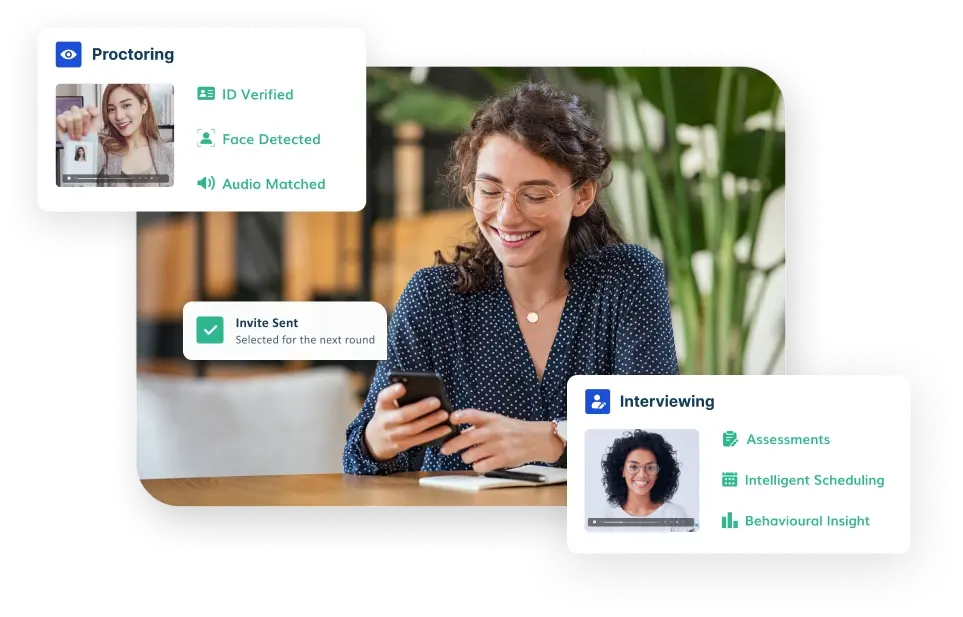
- Identity confirmation: The webcam feed is matched against an ID or a reference photo at login, so the same person stays in frame throughout the exam.
- Room and environment checks: A quick pan or a fixed wide-angle view confirms there are no unauthorized notes, devices, or additional people in the room.
- Behavior flagging: The system flags moments where the test taker looks away repeatedly, leaves the frame, or where a second face appears, all common signals in webcam proctored test cheating.
- Spoofing and virtual camera checks: More advanced systems also run virtual camera detection, checking that the video feed is coming from a genuine, live webcam rather than a pre-recorded clip or virtual camera software designed to fake the feed.
Some institutions also use dual camera proctoring, where a secondary device, often a phone, provides a side or room view in addition to the primary webcam. This combination makes cheating webcam attempts, like using a phone off-screen or having someone else in the room, considerably harder to pull off unnoticed.
How to Test Your Webcam Before an Online Exam
A large share of exam-day problems come down to one simple thing: an untested camera. Before your exam, run through this webcam test checklist:
- Check browser permissions. Make sure your browser has permission to access your camera and microphone, and that no other app is currently using the webcam.
- Confirm the right camera is selected. If your laptop has a built in camera and you also have an external one plugged in, check your exam platform is pointed at the correct device.
- Test your lighting and framing. Sit facing a light source rather than a window behind you, and make sure your face is clearly visible and centered in frame.
- Run a live preview. Most proctoring platforms, including Talview's, show a live camera preview before the exam starts. Use it to confirm video quality and framing before you begin.
- Check your internet connection. A stable connection matters as much as the camera itself, since a dropped feed can be flagged the same way a covered camera would be.
Is Webcam Monitoring Safe and Private?
This is one of the most common concerns test takers raise, so it is worth answering plainly.
Can a webcam see your screen?
No. A webcam only captures what is physically in front of it, your face and the room behind you. It cannot see what is displayed on your monitor. Screen activity, if it is monitored at all, is handled separately through screen recording or browser lockdown tools, not through the webcam feed.
Is webcam test safe?
Reputable proctoring platforms are built to record and analyze only exam-relevant activity, and access to footage is limited to authorized reviewers for a defined retention period. Webcam monitoring is not designed to browse a device, access files, or monitor anything outside the exam window.
What are the Benefits Webcam Monitor?
-
Enhanced Security: Webcam Monitoring serves as a deterrent to cheating, thereby preserving the integrity of online exams.
-
Real-time Monitoring: Enables immediate intervention in case of suspicious behavior, ensuring a fair testing environment.
-
Flexibility: Allows for remote proctoring, eliminating the need for physical presence during exams.
-
Scalability: Webcam Monitoring can accommodate a large number of test-takers simultaneously, making it suitable for various educational institutions and certification programs.
Use Cases
-
Educational Institutions: Webcam Monitoring is widely used by educational institutions to conduct secure online assessments and maintain academic integrity.
-
Certification Exams: Professional certification bodies employ Webcam Monitoring to verify the identity of candidates and ensure compliance with exam regulations.
-
Remote Learning: In the era of remote learning, Webcam Monitoring facilitates the conduct of remote exams, quizzes, and assessments with integrity.
FAQs
Q: Is webcam monitoring intrusive? A: Webcam monitoring focuses solely on the test taker's actions relevant to the exam, ensuring privacy and compliance with regulations. It does not access files, browsing history, or anything unrelated to the exam session.
Q: Can webcam monitoring be cheated? A: Webcam monitoring uses advanced algorithms alongside human proctors to detect suspicious behavior, minimizing the risk of cheating. Techniques like virtual camera spoofing or pre-recorded video are specifically what more advanced detection checks are built to catch.
Q: What if there are technical issues with the webcam during the exam? A: Technical support is available to help resolve webcam related issues promptly, and running the pre-exam camera test described above prevents most of these issues before they happen.
Q: Can a webcam see what's on my screen?
A: No. A webcam captures video of you and your surroundings only. It has no access to your screen's content, which is a separate concern handled by different tools like browser lockdown.
Q: Will my camera light turn on during a proctored exam?
A: Yes. When webcam monitoring is active, your camera indicator light will be on for the duration of the exam, the same as it would be during any video call, so you always have a visual confirmation that the camera is recording.
Q: Is it safe to allow webcam access for an online exam?
A: Reputable proctoring platforms only activate the camera for the duration of the exam and limit footage access to authorized reviewers under a stated retention policy. It is reasonable to expect the platform to be transparent about what is recorded and for how long.
Q: How do I test my webcam before an online exam?
A: Check that your browser has camera permission, confirm the correct camera is selected if you have more than one, test your lighting and framing, and use the platform's live preview if one is available. Most exam-day issues come from an untested setup rather than a faulty camera.
 EN
EN



.svg "webcam (1)")

.svg "robot (1)")