Try for Free

automated online exam proctoring

Automated Proctoring for Secure, Verified Online Exams

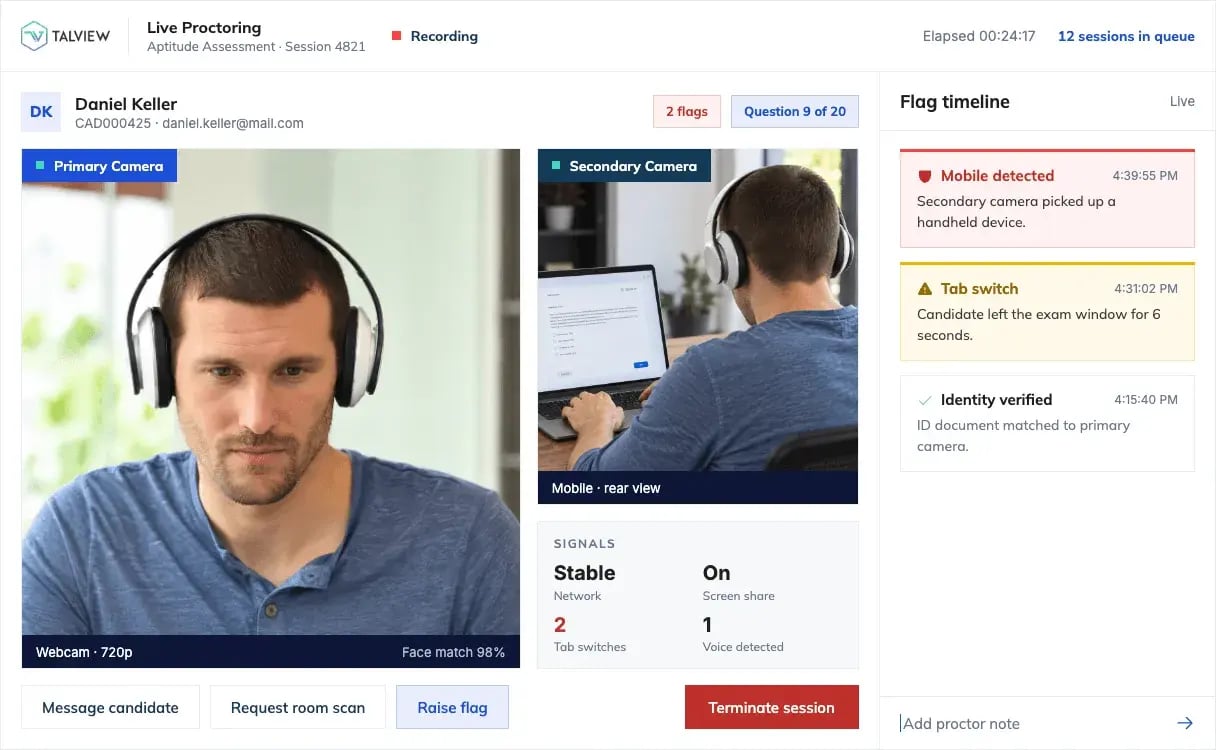
Talview's remote proctoring software verifies every test taker, monitors the session with a primary and secondary camera, produces an integrity score your team reviews after the exam.

  • SOC 2
  • ISO 27001
  • GDPR
  • WCAG 2.2 AA

Exam boards, universities and enterprise hiring teams run on Talview

Cambridge Assessment
La Trobe University
City and Guilds
RM Education
IHRP
NVIDIA
DBT Labs
American Association of Airport Executives
Eastern Washington University
Atos
OET
CollegeBoard Latam
trinity college london
onegmac

Automated online proctoring at a glance

Online exam security built into every session.

Live Screen Recording

Records the candidate's screen for the whole session, so reviewers see what was open, not a guess.

Eight-plus Critical Flags

Flags the events that matter most, from leaving the test screen to unauthorised materials in view, so reviewers get a shortlist instead of a full recording.

Multiple Face Detection

Flags any moment when more than one face appears on camera, so a second person in the frame is on the record, not left to the reviewer's eye.

360° Environment Check

Candidates show the full room on camera, so the test space is checked, not assumed.

Mobile Browser Proctoring

Candidates can sit a proctored exam from a mobile browser, so a candidate without a desktop is not excluded.

Customized Branding

The exam experience carries your organisation's brand, end to end.

How It works

Prove who is there before the exam. Score what happened after it.

Before the exam

Authenticate every test taker's identity

  • Matches the candidate's face to their photo ID
  • Adds voice matching as a second identity signal
  • Returns a confidence score on every match
  • Supports two-factor authentication before the exam opens

Designed to surface proxy candidates before the first question loads.

Authenticate Test Takers Identity Before the Exam (1)
After the exam

A comprehensive integrity score for every test taker

  • Typically produced within 24 hours of the exam ending
  • Shows the degree of potential misconduct in each session
  • Links each flag to the session evidence, so your team knows where to look

The score tells your reviewer where to look. Your team makes the call.

Comprehensive Integrity Score

Turn on what the exam needs

Three Test Security Controls for Any Exam

Secondary-Camera

Better Candidate Monitoring with Dual Camera Proctoring
Learn More

secure-browser

Create a Secure and Controlled Test Environment

Learn More

Prevent Candidate Impersonation

Strengthen Academic Integrity With Continuous Authentication

Learn More

DEPLOYS IN ONE WEEK

Three ways to connect.

Build

SDK or JavaScript, into your own exam platform.

Extension

Browser extension for Moodle, Canvas, Blackboard, and others.

Wrapper

Sits over your existing exam link. No integration required.

Thought-Industries
Moodle-Integration
Canvas LMS
anthology-logo
Skilljar
EdX_Logo
Open-edx-logo
Absorb-logo
Docebo
D2L_Logo
Cornerstone

Choose the level of oversight each exam needs.

Remote from fully automated to a live invigilator, or in-center

WHERE IT ALREADY RUNS

What our customers achieved

Their results, in their engagements. Not a generalizable promise.

200+ delivery agents

Cambridge

Onboarded in one engagement

12,000 students/ semester

La Trobe University

Deployment scale, not detection volume

2,000 → 30,000 test-takers

GBTS

Programme growth

Reviewed by the people who run the sessions

Read the reviews on G2 →
G2-Leader
G2-Momentum-Leader
g2-users-love-us
G2-Best-ROI
G2-Highest-User-Addoption

Before the form, the questions you were going to ask

Still unanswered? Talk to our team and we will walk you through a live session.

What is automated proctoring?

Automated proctoring that uses AI to supervise online exams without a live invigilator. It analyses the test taker's webcam feed, screen and audio for irregularities and flags them for review. Because no one has to watch each session live, it scales to high-volume exams.

How does automated proctoring work?

Automated proctoring works in three stages. Before the exam, it authenticates the test taker with face-to-photo ID and voice matching. During the exam, it watches for signs of malpractice, such as unusual eye movements, unauthorised materials or leaving the test screen, and flags them in real time.

How does automated proctoring verify identity?

Talview's automated proctoring matches the test taker's face to their photo ID and adds voice matching as a second signal. Each match returns a confidence score, and two-factor authentication can be required before the exam opens. Together, these checks are built to stop proxy candidates.

What are the key features of Talview automated proctoring?

Real-time behaviour analysis and flagging, identity verification to prevent impersonation, a secure browser that restricts access to unauthorised resources, a secondary camera, detailed integrity reports, and integration with your LMS.

Can automated proctoring be used for all types of exams?

It works across a wide range of exam formats, from multiple-choice tests to essay-based assessments. That lets institutions run the same secure testing setup across disciplines.

Run one exam through it. Then decide.

One exam. One requisition. Thirty to sixty days. See it on your own sessions before you commit to anything larger.