


.svg.png?width=1200&height=617&name=1200px-RM_Education_(logo).svg.png)
Blog / Online Exams & Proctoring
Identity Verification for Online Exam Proctoring in 2026

Every remote exam begins with the same question: is the registered candidate actually the person sitting at the screen? For universities running high-stakes credential exams and certification bodies issuing professional licenses, a wrong answer to that question undermines every score issued and every credential granted. Online exam proctoring now depends on reliable identity verification to close that gap.
This guide breaks down how identity verification works in remote proctoring, which methods matter most, and how to evaluate platforms for audit-ready, defensible outcomes. You will find technical frameworks, step-by-step evaluation criteria, and practical considerations for accessibility and compliance.
Key Takeaways: Identity Verification for Online Exam Proctoring
- Identity verification confirms the registered candidate is the person taking the exam, protecting credential integrity at scale.
- Effective verification combines government ID authentication, facial biometrics, and behavioral analysis in a layered approach.
- Talview ID Verification uses real-time face matching and government ID validation to prevent impersonation during remote exams.
- Privacy-preserving verification methods, including on-device processing, help institutions meet GDPR and regional data residency requirements.
- Audit-ready verification logs and integrity scoring give institutions defensible documentation for accreditation and dispute resolution.
What Is Identity Verification in Online Exam Proctoring?
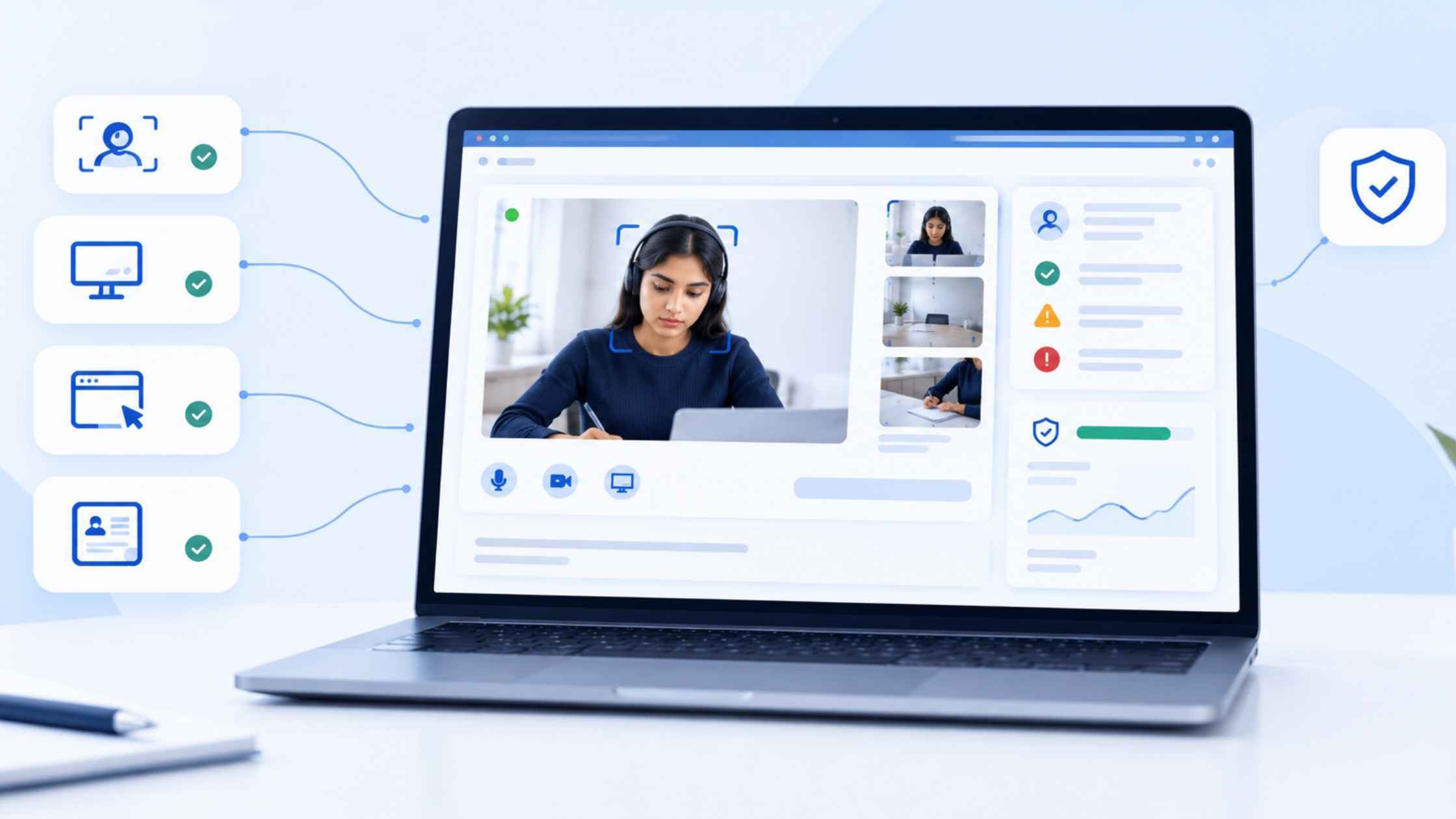
Identity verification in online exam proctoring is the process of confirming that the person taking a test matches the individual who registered for it. This confirmation happens at the start of the session and, in more advanced systems, recurs throughout the exam.
The process typically involves two or more data points: a government-issued photo ID and a live image or video of the test-taker captured through their webcam. Advanced platforms compare these inputs in real time using AI-powered facial recognition, matching the ID photo against the live image to confirm a match.
For universities administering thousands of remote exams per semester and certification bodies granting professional licenses, weak verification creates a direct path to impersonation and proxy testing. According to a 2026 IEEE study on automating identity verification in exams, institutions that rely on manual ID checks alone face significantly higher rates of identity fraud compared to those using biometric verification.
Why Universities and Certification Bodies Need Robust Verification
Credential Integrity Depends on Verified Identity
When a university grants a degree or a certification body issues a professional license, the value of that credential rests on the assumption that the recipient earned it. If a proxy test-taker completed the exam, the credential becomes meaningless. The institution's accreditation standing, employer trust, and public reputation all degrade.
Accreditation bodies like the Higher Learning Commission (HLC) explicitly require institutions to verify student identity in distance education. This is not a recommendation. It is a compliance requirement that affects an institution's accreditation status.
The Scale Problem in Remote Exams
A single university may administer tens of thousands of online proctored exams in a given semester. Manual ID verification at that volume is not feasible. Human reviewers introduce inconsistency, fatigue, and bottlenecks that slow exam check-in and create backlogs.
Automated identity verification addresses the scale problem by processing ID authentication and facial matching in seconds rather than minutes. This reduces check-in time, eliminates human error in the verification step, and frees proctors to focus on behavioral monitoring during the exam.
How Identity Verification Works in Remote Proctoring Platforms
Step 1: Document Capture and Authentication
The test-taker is prompted to hold a government-issued photo ID (passport, driver's license, or national ID card) in front of their webcam. The system captures a high-resolution image and runs it through document authentication algorithms that check for tampering indicators, such as altered fonts, inconsistent holograms, and mismatched layouts.
The document authentication step serves two purposes. First, it confirms that the ID itself is genuine. Second, it extracts the photo and name from the ID for comparison against the live candidate image and registration data.
Step 2: Facial Biometric Matching
Once the ID is authenticated, the platform captures a live image or short video of the test-taker through their webcam. AI-powered facial recognition algorithms compare the live image against the extracted ID photo, calculating a match score based on facial geometry, feature distances, and other biometric markers.
Talview ID Verification performs this face-to-photo matching in real time, using AI to compare the live candidate against their government ID. The system also supports secure document capture and automated checks, integrating directly into the assessment workflow so the verification step does not require a separate login or manual review.
Step 3: Ongoing Identity Monitoring
Verification at the start of an exam is necessary, but not sufficient. An exam may last two or three hours. A verified candidate could leave and have a proxy complete the remaining portion. Advanced proctoring systems address this by running periodic facial checks throughout the session.
Talview's Alvy AI Proctoring performs identity monitoring as part of its broader behavioral analysis during the exam. If the person at the camera changes or the verified face is no longer visible, the system flags the event for human review. This approach replaces the one-time ID gate model with a layered verification that runs from start to finish.
How to Evaluate Identity Verification in a Proctoring Platform
Accuracy and Bias Mitigation
Request specific false acceptance rates (FAR) and false rejection rates (FRR) for the platform's facial matching engine. A low FAR means fewer impostors pass verification. A low FRR means fewer legitimate candidates are incorrectly flagged or blocked.
Ask whether the facial recognition model has been tested across demographic groups and lighting conditions. Bias in facial recognition is a documented problem. Platforms that address it transparently, with published testing methodology, are more credible than those that do not.
Multi-Layer Verification Architecture
A single verification method is a single point of failure. Evaluate whether the platform supports at least two independent verification layers, such as document authentication combined with facial biometric matching, plus behavioral monitoring during the exam.
Talview's approach to exam security layers ID verification, facial matching, behavioral analysis, and environment scanning into a unified workflow. This layered approach means that a failure in one method does not automatically compromise the entire verification process.
Integration with LMS and Exam Delivery Systems
Identity verification must connect to your existing technology stack. If verification runs as a standalone tool that requires separate login credentials and data entry, adoption will drop and candidate frustration will rise.
Check for integration support through LTI 1.3, Open API, and direct LMS connectors. Talview's proctoring API is built for this purpose, connecting identity verification and proctoring directly into existing exam delivery platforms with zero-code integration.
Audit Trail and Reporting Capabilities
Every verification event, from ID capture to facial match score to mid-exam flags, must be logged in a tamper-resistant audit trail. This log is your evidence base when disputes arise, when accreditation reviewers request documentation, or when regulators audit your exam processes.
Evaluate the granularity of the platform's reporting. Can you see individual match scores per candidate? Are flagged events time-stamped and linked to video evidence? Talview generates integrity reports that combine verification data with behavioral monitoring results, creating a single documentation source for each exam session.
Privacy and Compliance in Identity Verification for Exams
GDPR, FERPA, and Regional Data Residency
Identity verification involves collecting sensitive personal data: government ID images, biometric facial data, and in some cases behavioral profiles. Institutions must handle this data under applicable privacy regulations, including GDPR in the EU, FERPA in the US, and regional data protection laws in jurisdictions like the UAE and Australia.
Key questions to ask a proctoring vendor: Where is biometric data processed and stored? Is on-device processing available to minimize data transfer? Can you configure data retention periods and automatic deletion policies? Talview supports region-specific hosting to address data residency requirements for institutions operating across multiple jurisdictions.
Candidate Transparency and Consent
Test-takers must know what data is collected, why it is collected, and how long it is retained before the exam begins. Clear, accessible privacy notices at the point of verification are a compliance requirement under GDPR and a trust-building practice under any regulatory framework.
Platforms should also support alternative verification paths for candidates who cannot complete biometric verification, such as those with disabilities that affect facial recognition accuracy or candidates in regions with specific biometric data restrictions.
Data Minimization and Secure Processing
Collect only the data necessary for verification. If the verification can be completed by comparing a live image to an ID photo and discarding the raw data after confirmation, that approach carries less risk than storing biometric templates indefinitely.
On-device processing, where facial analysis runs locally on the candidate's machine rather than being transmitted to a central server, reduces the attack surface and supports data minimization principles. Look for platforms that encrypt biometric data at rest and in transit and that limit access to verification records through role-based controls.
Accessibility and Fairness Considerations in Verification
Reducing Bias in Facial Recognition Systems
Facial recognition algorithms can produce higher error rates for certain demographic groups depending on the training data used. Institutions must evaluate whether a proctoring vendor has tested its model across skin tones, ages, and facial structures to ensure equitable performance.
Ask for documentation of bias audits and accuracy testing across diverse populations. A platform that publishes its methodology and results demonstrates accountability. Talview's approach to accessible and fair proctoring is built on reducing false flags and supporting fairness across candidate demographics.
Accommodating Candidates with Disabilities
Some candidates may not be able to position themselves in front of a webcam in the expected manner due to physical disabilities. Others may have conditions that cause facial recognition algorithms to produce lower match scores, such as facial prosthetics or conditions that alter facial geometry.
Platforms must support accommodation workflows that allow exam administrators to adjust verification thresholds or approve alternative verification methods for candidates with documented needs. WCAG-aligned interfaces ensure that the verification process itself is accessible to candidates using assistive technologies.
Common Threats That Identity Verification Addresses
Proxy Testing and Impersonation
Proxy testing occurs when someone other than the registered candidate completes the exam. This is the most direct form of exam fraud and the primary threat that identity verification targets. Without facial biometric matching, a proxy only needs the candidate's login credentials to take the exam.
Multi-layer verification, including ID authentication at check-in plus ongoing facial monitoring during the exam, directly counters proxy testing. The combination makes it significantly harder for a substitute to pass both the initial ID check and the periodic re-verification throughout the session.
AI-Generated Deepfakes and Synthetic Identities
Generative AI tools can now produce realistic face swaps and synthetic ID documents. This is not a theoretical risk. A Talview analysis of AI cheating tools documented the speed at which these technologies have advanced, with AI-generated output going undetected by standard tools in a significant percentage of cases.
Verification platforms must incorporate liveness detection, which distinguishes a live human face from a photo, video, or digital overlay presented to the camera. Advanced liveness checks analyze micro-movements, light reflections, and 3D depth cues that static images and basic deepfakes cannot replicate.
Credential Sharing and Account Takeover
In credential sharing, the registered candidate willingly shares their login information with another person. Account takeover involves unauthorized access through stolen credentials. Both threats bypass password-based authentication entirely.
Biometric verification closes this gap because a shared password does not transfer a face. If the person logging in does not match the registered biometric profile, access is denied. This is a fundamental advantage of biometric identity verification over credential-based authentication alone.
Step-by-Step Guide to Implementing Identity Verification
Step 1: Define Verification Requirements by Exam Type
Not every exam requires the same level of verification. A low-stakes quiz may need only a login and a brief facial check. A professional licensing exam demands multi-factor verification with ongoing monitoring and a detailed audit trail.
Map your exam portfolio by stakes level and assign verification requirements accordingly. This prevents over-verifying low-risk assessments (which frustrates candidates) and under-verifying high-stakes exams (which compromises credential integrity).
Step 2: Audit Your Current Technology Stack
Identify which systems currently handle exam delivery, candidate registration, and proctoring. Check for integration compatibility with identity verification platforms through LTI 1.3, SCORM, or API connectivity.
If your LMS is Canvas, Moodle, or Blackboard, verify that the proctoring vendor supports native connectors or LTI-based integration. Talview integrates with these platforms, along with Google Classroom and other major LMS systems, through its exam proctoring integration connectors.
Step 3: Run a Pilot with a Representative Candidate Group
Before a full rollout, test the verification process with a diverse group of candidates that reflects your actual test-taker population. Include candidates across different age groups, skin tones, lighting environments, and device types to identify accuracy gaps and usability issues.
Collect feedback on the candidate experience. Verification that is technically accurate but confusing or slow will generate complaints and reduce confidence in the exam process. Adjust thresholds and candidate instructions based on pilot results.
Step 4: Establish Escalation and Exception Handling Workflows
Automated verification will not resolve every case. Some candidates will fail facial matching due to significant appearance changes, low-quality webcams, or poor lighting. Your process must include a clear escalation path to human review.
Define who reviews escalated cases, what additional evidence they can request, and the maximum resolution time. Without this workflow, failed verifications become dead ends that block candidates from completing their exams.
Step 5: Train Administrators and Communicate with Candidates
Exam administrators need to understand how verification works, what flags to watch for, and how to handle escalations. Candidates need clear, advance communication about what to expect: what ID to have ready, how to position their camera, and what to do if verification fails.
Pre-exam communication reduces check-in delays, minimizes support requests, and sets expectations that reduce candidate anxiety. Include visual guides and FAQ documents in your candidate preparation materials.
How Talview Addresses Identity Verification for Exam Proctoring
Talview's approach to identity verification is built into its end-to-end exam proctoring platform rather than bolted on as an add-on. Talview ID Verification uses AI-powered face-to-photo matching and government ID validation to confirm candidate identity in real time at exam check-in.
Once the exam begins, Talview's Alvi AI Proctoring agent monitors identity on an ongoing basis, flagging events such as face changes, candidate absences, and the presence of unauthorized individuals. This replaces the one-time verification model with a defense-in-depth approach that covers the full exam session.
The platform's seven-layer security framework combines identity verification, environment scanning, behavioral monitoring, and secure browser controls into a unified system. Exam administrators receive integrity reports with time-stamped evidence for each session, creating audit-ready documentation that supports accreditation reviews and candidate disputes.
In Conclusion: Choosing Identity Verification for Defensible Exam Outcomes
Identity verification is the foundation of defensible remote exam outcomes. Every credential your institution issues rests on the assumption that the verified candidate was the person who completed the assessment. Weak verification creates liability. Strong verification creates trust.
Evaluate platforms on accuracy, bias mitigation, integration, audit-readiness, and privacy compliance. Prioritize layered verification that runs throughout the exam, not just at check-in. And choose a platform where identity verification is natively integrated with proctoring, behavioral monitoring, and reporting in a single system.
FAQs About Identity Verification for Online Exam Proctoring
What is identity verification in online exam proctoring?
Identity verification in online exam proctoring confirms that the registered candidate is the person taking the test. It typically involves government ID authentication and facial biometric matching at check-in, with ongoing monitoring during the session.
How does facial recognition prevent proxy testing in exams?
Facial recognition compares the live test-taker's face against their registered photo ID. Talview ID Verification performs this match in real time using AI, blocking access if the person at the screen does not match the registered candidate's biometric profile.
What privacy regulations apply to biometric data in exam proctoring?
GDPR, FERPA, and regional data protection laws govern biometric data collection in exam proctoring. Institutions must obtain consent, minimize data collection, and comply with data residency requirements. Talview supports region-specific data hosting to meet these obligations.
Can identity verification systems accommodate candidates with disabilities?
Yes. Talview's verification supports accommodation workflows that allow administrators to adjust thresholds for candidates with documented needs, and its WCAG-aligned interfaces ensure the verification process is accessible to those using assistive technologies.
How does AI-powered liveness detection counter deepfake threats?
Liveness detection analyzes micro-movements, light reflections, and depth cues to distinguish a live face from a photo, video replay, or AI-generated deepfake. This step runs during the initial verification and can repeat throughout the exam session for added security.